Showing posts with label react. Show all posts

Tuesday, January 11, 2022

create-react-app

>npx create-react-app antd-tutorial
Need to install the following packages:
  create-react-app
Ok to proceed? (y) y

You are running `create-react-app` 4.0.3, which is behind the latest release (5.0.0).

We no longer support global installation of Create React App.

Please remove any global installs with one of the following commands:
- npm uninstall -g create-react-app
- yarn global remove create-react-app

The latest instructions for creating a new app can be found here:
https://create-react-app.dev/docs/getting-started/

How do we resolve this issue?

>npx clear-npx-cache

Tuesday, July 20, 2021

Upload React to AWS S3

Direct upload to AWS S3.

  • Create s3 bucket
  • Use Upload UI to upload the whole build folder.


  • In the Properties, scroll down to the bottom and the static web site hosting. Enable it. Amazon will assign a http subdomain.

  • Go to AWS cloudfront to create a new distribute.


  • Check New distribution.


Monday, July 19, 2021

Isomorphic Application

What is Isomorphic Application?

Firstable, what is Isomorphic?
To be simple, that is to have the same result from different approaches.

In this case, we may easy to understand what is Isomorphic Application.
That could be an application with same results from different approaches.
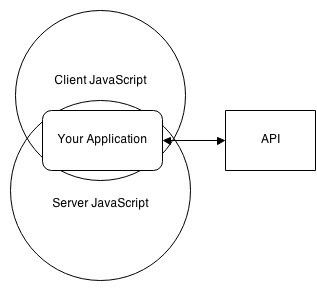
One particular case for the web page is a web page generated from both client side and server side.

In the old days, server side technology to be used to generate a web page. That just has a lot of payload, like full HTML syntax, JS, and CSS. Search engine can understand that if content is all embedded inside HTML markup.

For the modern single page application (SPA), a big huge chunk of JS is loaded ahead of data. This is the way to minimum to payload and improve the user experience.

There are few of Isomorphic applications. The most popular for these days is React w/Next.


In Next, the first request page will be generated from the server side. In this case, search engine can understand page semantics. For the rest of clicking/action, the client side js is used in order to take advantage SPA. If any page refresh, once again the server rendering is triggered.


Sunday, July 18, 2021

VSCode react shortcut

Install React code snippets extension to VSCode.

rcc->  == class component skeleton
rsc->  == stateless component skeleton
rsf->  == stateless named function skeleton

React render props with typescript

Apply static type to props with typescript.


import React from 'react';
import './App.css';

interface SectionProps {
  titlestring;
  render(): React.ReactNode;
}

const RenderPropsComponentReact.FC<SectionProps> = (props=> {
  return (
    <section>
      <h2>{props.title}</h2>
      {props.render()}
    </section>
  )
}

const SampleRenderProps1React.FC = () => {
  return (
    <RenderPropsComponent
      title="First Component"
      render = {()=> {
        return (
          <p>
            My first description
          </p>
        )
      }}
    />
  )
}

const SampleRenderProps2React.FC = () => {
  return (
    <RenderPropsComponent
      title="Second Component"
      render = {()=> {
        return (
          <p>
            Another description
          </p>
        )
      }}
    />
  )
}

const AppReact.FC = () => {
  return (
    <div className="app">
      <h1>Render Props Example</h1>
      <SampleRenderProps1 />
      <SampleRenderProps2 />
    </div>
  );
}

export default App


Result:


Saturday, July 17, 2021

React-admin with typeORM

1. React-admin missing X-total-count issue.
Need to fix it from server side response header in order to meet react-admin requirement.

To fix it, add extra response header: Category.tsx

 // GET ALL
  @Get('')
  public async getAll() {
    //return getCategory();
    let objs = await getCategory();
    if (Array.isArray(objs)) {
      let total = objs.length;
      // react-admin
      this.setHeader('Access-Control-Expose-Headers''X-Total-Count')
      this.setHeader('X-Total-Count'total+"")
    }
    return objs;
  }


2. Unable to update data if primary id also submit from data. typeORM only take ID from URL parameter, not from data.

[1] GET /api/categories?_end=10&_order=ASC&_sort=id&_start=0 200 1.591 ms - 390
[1] Caught Validation Error for /api/categories/undefined: { categoryId: { message: 'invalid float number', value: 'undefined' } }
[1] GET /api/categories/undefined 422 0.702 ms - 176

To fix it, tailor the submission data: category.router.ts

export const CategoryEdit = (props:any=>{
    //typeORM doesn't like to have id in the submission data again.
    const transform = (data:any=> {
        const {id, ...newData} = data;
        return newData;
    };
    return (
        <Edit title="Edit Category" {...props} transform={transform}>
            <SimpleForm>
                <TextInput source="name" />
            </SimpleForm>
        </Edit>
    )
};


Thursday, January 21, 2021

Query all images in gatsby

 The query is 

query MyQuery {
  allFile {
    edges {
      node {
        name
        ext
      }
    }
  }
}